The remote file has been changed...

Advertisement

Bill_Fields
Joined:
Posts:
9
Location:
Portland, OR

The remote file has been changed...

Using WinSCP 6.5.5 with "Explorer" interface on Windows 11 Enterprise 23H2.

I have two remote sessions open, and I'm using NP++ to edit a text file from HostB. If WinSCP has the tab from HostA selected and I save a change to the file on HostB, I get the following message:
---------------------------
Confirm
---------------------------
The remote file has been changed while you were editing it. Do you want to overwrite it anyway?
---------------------------
OK Cancel Help
---------------------------
This happens every time. If the tab for HostB is selected, there's no message when I save the file. Not a serious issue that I can see, but it is bothersome.

This is a typical scenario for me (editing a file on one remote host while I'm looking at other remote hosts), so I have to say that it started happening with v6.5.5.

Thanks.

Reply with quote

Advertisement

martin
Site Admin
martin avatar
Joined:
Posts:
42,746
Location:
Prague, Czechia

Re: The remote file has been changed...

Thanks for your report. Though I cannot reproduce the problem.
Please start WinSCP with /applog=C:\some\path\app.log command line parameter, enable also session logging, reproduce the problem, and post both app and session logs.

Reply with quote

martin
Site Admin
martin avatar
Joined:
Posts:
42,746
Location:
Prague, Czechia

Re: Logs attached

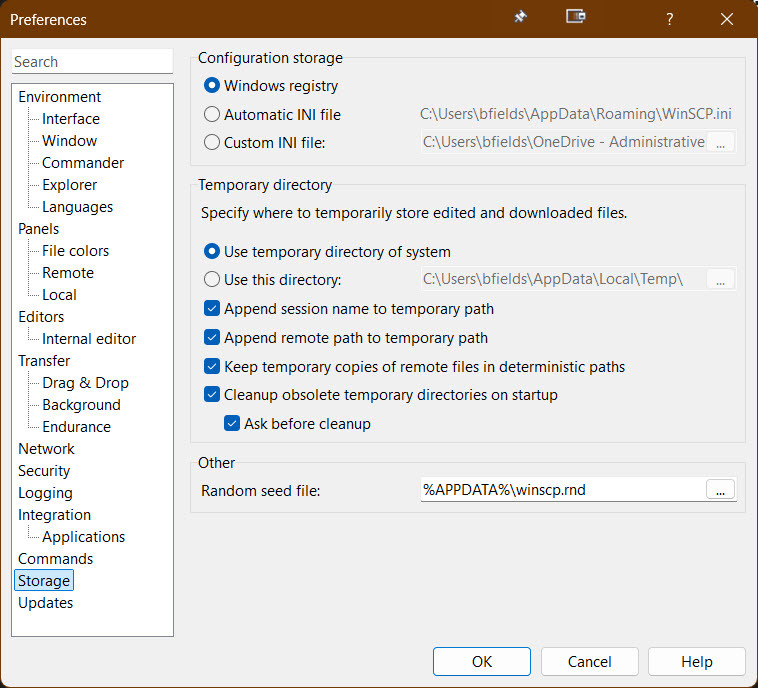
@Bill_Fields: It looks like you are editing the same file on two different servers. And you have enabled option "Keep temporary copies of remote files in deterministic paths", but not "Append session name to temporary path". With that combination, the two files are saved to the same local temporary path, overwriting one another, causing havoc.

Try enabling "Append session name to temporary path", it should resolve your problem. If not, please post new logs (and please try to reproduce the problem with as little opened sessions as possible).

Reply with quote

Advertisement

martin
Site Admin
martin avatar

Re: Logs attached

Sorry, you are indeed right.
Isn't it possible that you has multiple sessions to orbdb-orbdb-rep opened?

Reply with quote

Bill_Fields
Joined:
Posts:
9
Location:
Portland, OR

Re: Logs attached

It was possible, but unlikely.

I captured a new set of logs, with just 3 sessions open. Please see attached.
  • logs_3-3-26.zip (60.92 KB, Private file)

Reply with quote

Advertisement

Bill_Fields

Re: Logs attached

I would like to add that the prompt to save does actually work on the right file under the right host. So, as long as I pay attention to what I'm saving, the end result is correct.
Thank you so much for this great tool.

Reply with quote

Advertisement

You can post new topics in this forum